
A Mac metadata editor
for App Store Connect
AppBoard is a native macOS app for indie developers and small teams that edits App Store metadata language by language, logs every change and keeps all your apps in one workspace. It costs $24.99 once, with no subscription.

App Store Connect is more complex than you think
Development is done, but store info management is just beginning
One-time purchase on the Mac App Store
Shortcut-driven tab switching
Change history of every metadata edit
A native app for your Mac
See appBoard at work
The same frames that run on the Mac App Store listing — full size.
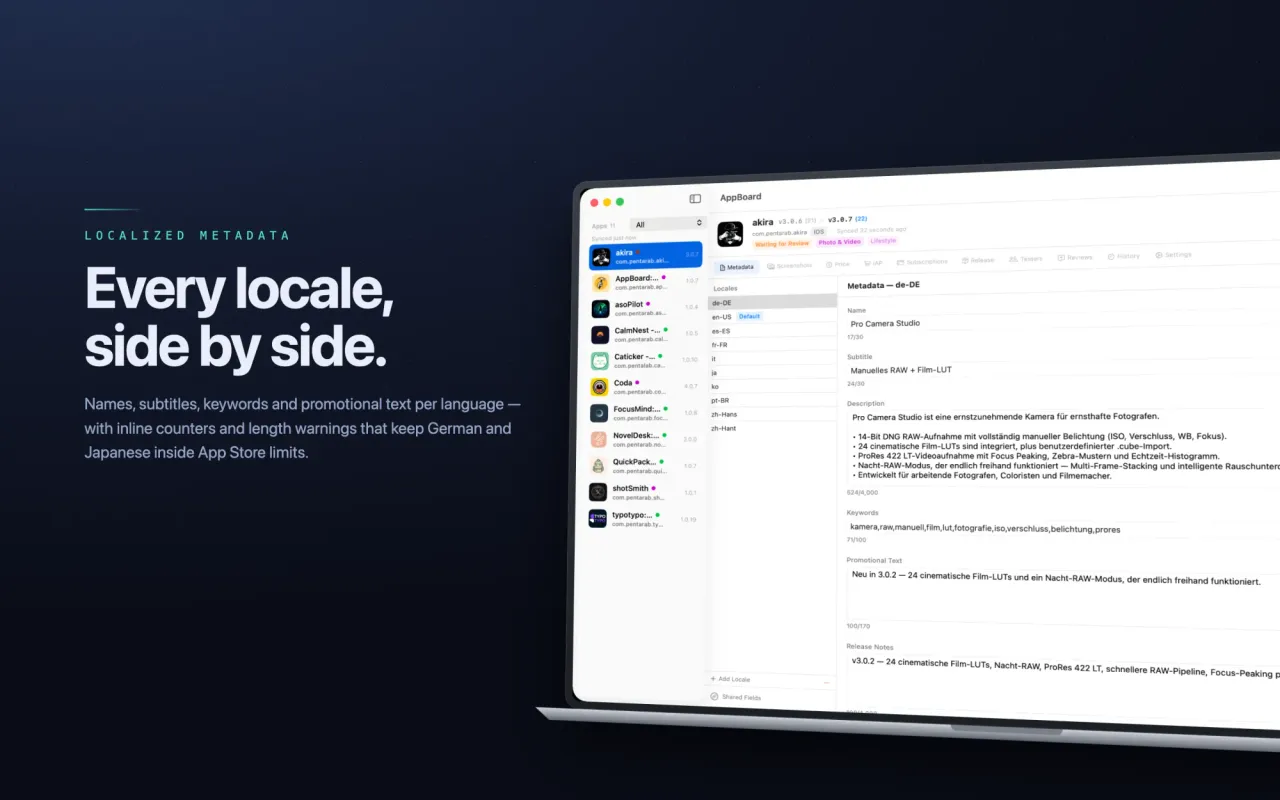
Names, subtitles, keywords and promotional text for every language, with live counters that keep German and Japanese inside App Store limits.
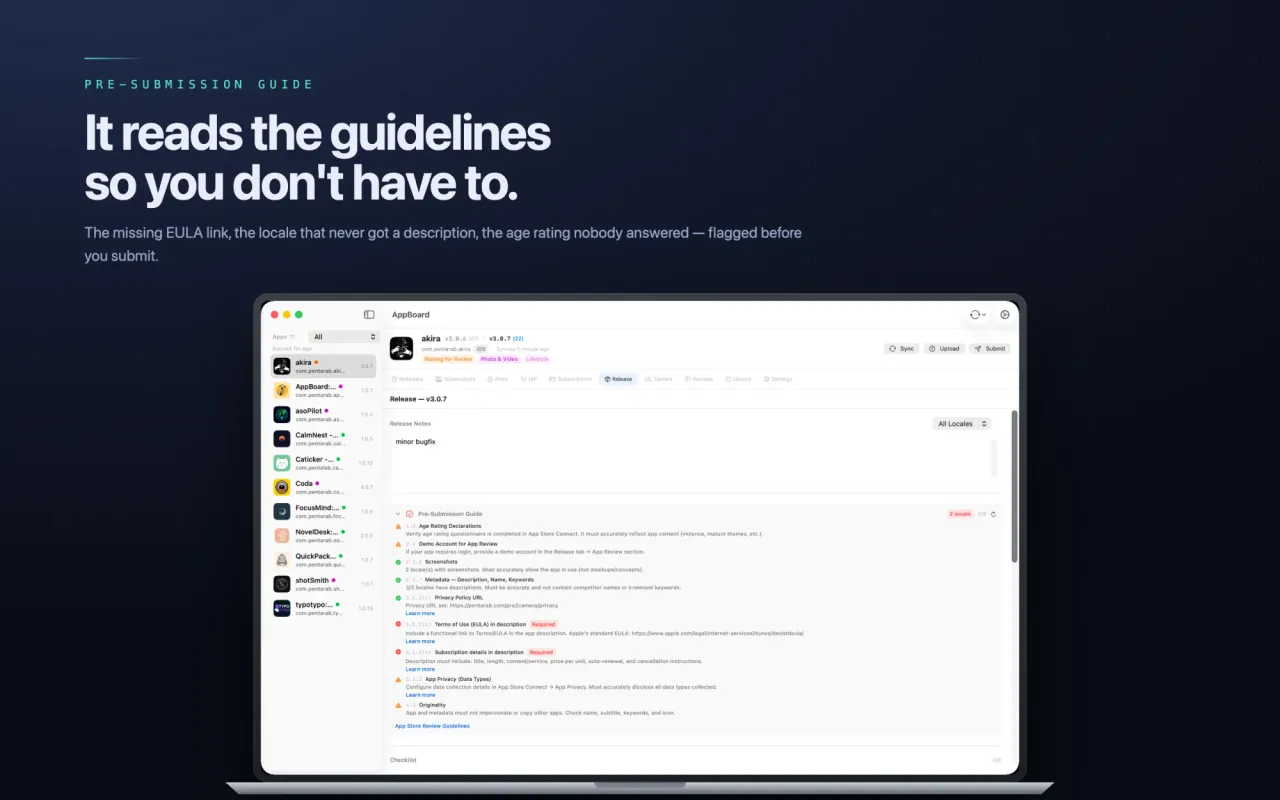
The missing EULA link, the locale with no description, the age rating nobody answered — flagged before you hit submit.
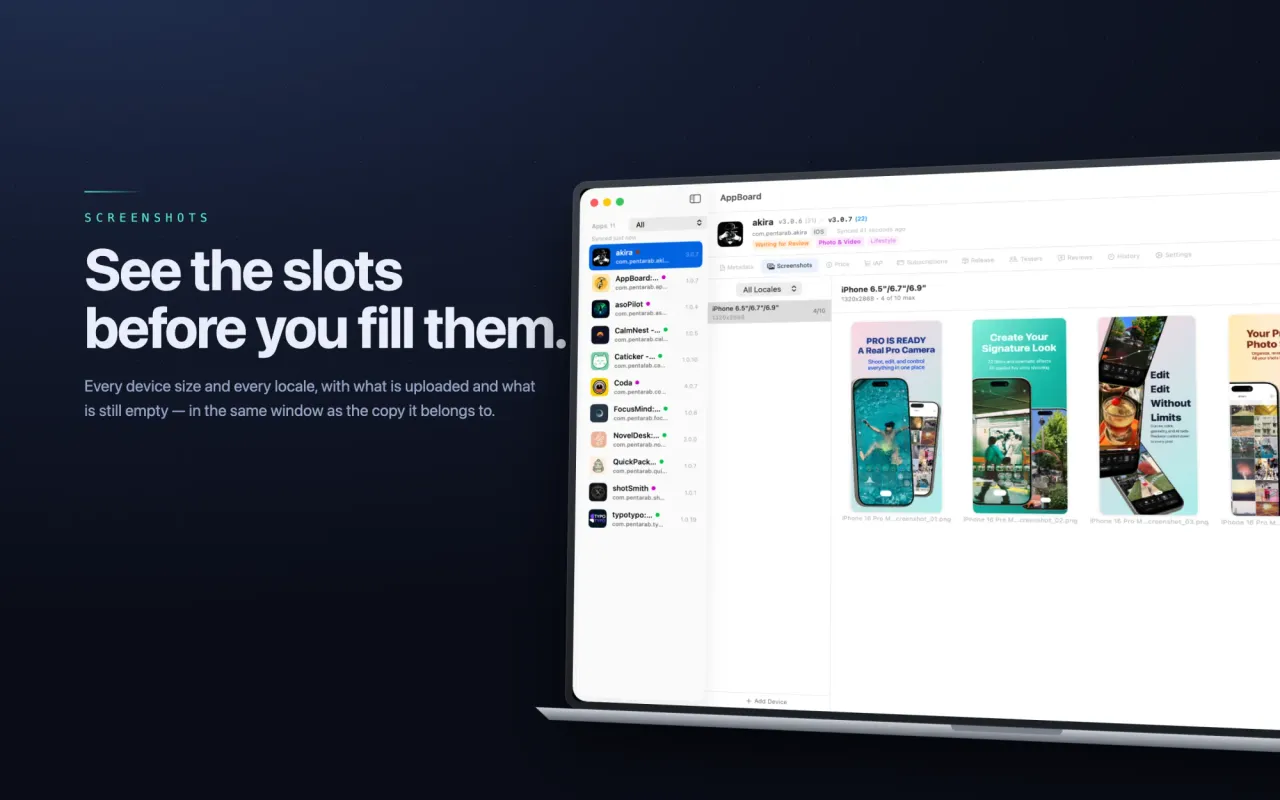
Every device size and every locale, showing what is uploaded and what is still empty, beside the copy it belongs to.
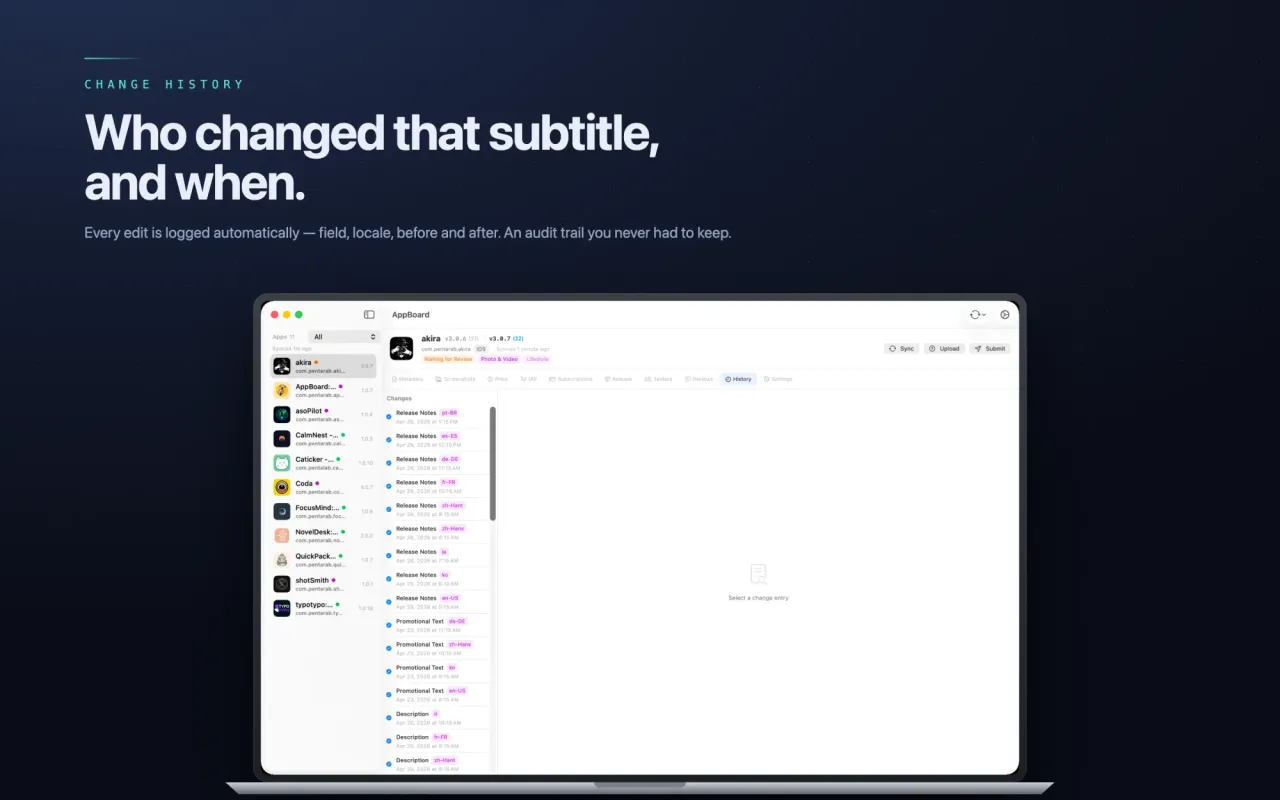
Every edit is logged automatically — field, locale, before and after. The audit trail you never had to keep.
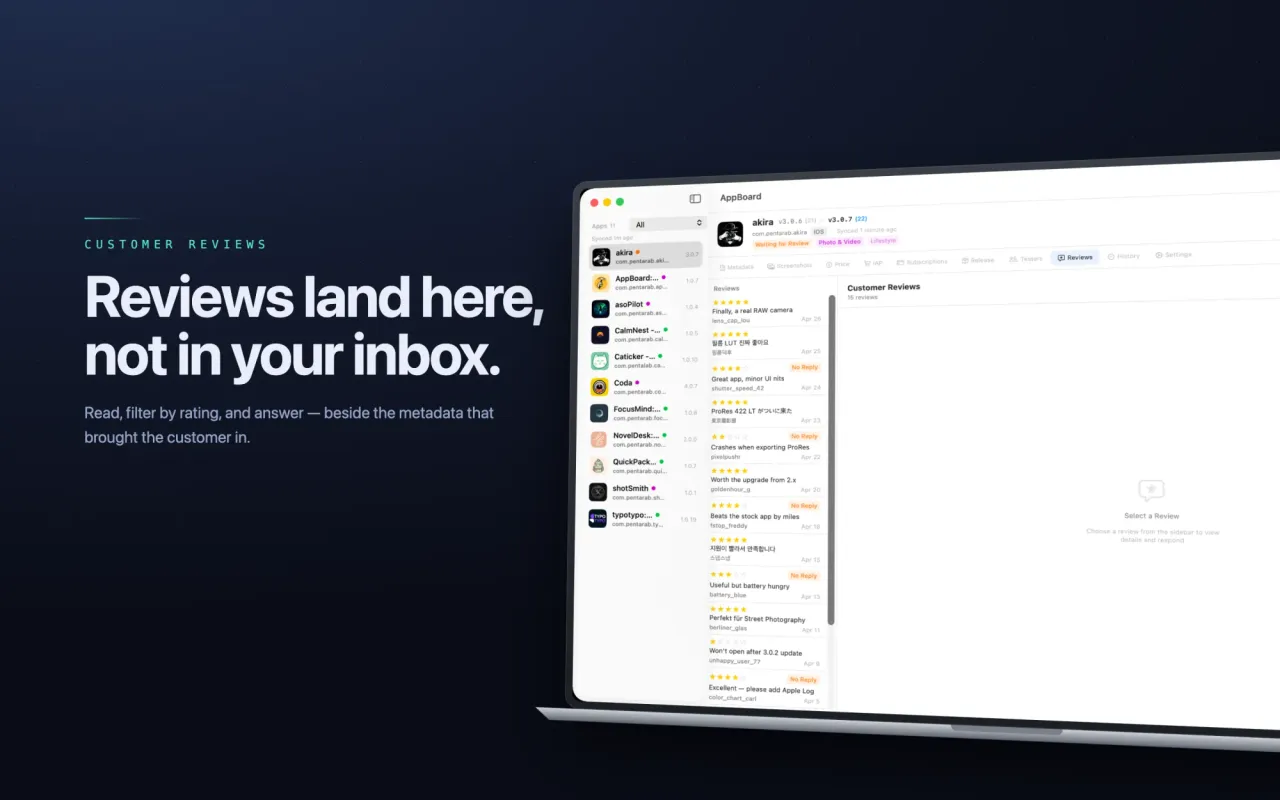
Read, filter by rating and reply, right next to the metadata that brought the customer in.
All of App Store Connect, in one app
Multi-Language Metadata
- Edit app name, description, and keywords for every language on one screen
- Real-time two-way sync with App Store Connect
- Character counters and a side-by-side default-locale reference
Screenshot Management
- Organize screenshots by language and device size
- See what is uploaded and what is still empty
- Slots shown beside the copy they belong to
Pricing & Territories
- Price, In-App Purchase and Subscription tabs for each app
- Pricing sits beside metadata and screenshots in one workspace
Metadata Change History
- Automatically record every metadata edit
- Track when, what, and how each field changed
- See changes instantly with Before/After diffs
Smart Release Notes
- Apply release notes to every language at once
- Fine-tune notes individually per language when needed
- Keep a per-version history of release notes
Release Checklist
- Manage ASC readiness with custom checklists
- Never miss an item on release day
- Automatic detection and alerts for missing entries
Unified App Management
- Manage multiple iOS/macOS apps from a single dashboard
- Switch between apps instantly to see status at a glance
- Independent settings and environment per app
Review Info Management
- Store demo accounts, test steps, and review notes
- Keep review info separate per app
- Submit to ASC without leaving anything behind
Real-time ASC Sync
- Real-time two-way sync with App Store Connect
- Keep local edits and remote state always up to date
- macOS system notifications when operations complete
Keyboard Shortcuts
- Switch tabs instantly with ⌘1–6
- Handle every key task without touching the mouse
- Feels as fast as a terminal
Environment & Security
- Encrypted at rest, scoped by project
- Per-app environment variables
- Managed locally — no shared team state required
Built for people like you
Teams maintaining many locales
For anyone tired of clicking through language tabs and wanting counters and a reference locale beside the copy
Developers managing multiple apps
For anyone juggling distinct metadata, screenshots, and pricing across apps
Designers who swap screenshots often
For anyone who wants to see every screenshot slot, per device and locale, at a glance
Teams preparing releases
For anyone who wants a checklist and a pre-submission guide before every submit
Before and after appBoard
With the ASC web only
- Click through language tabs one at a time
- No history, so no idea who changed what, when
- Check screenshot slots one device and locale at a time
- Learn about a missing EULA link only after submitting
- Copy-paste release notes into every language
- Keep notes, credentials and checklists in scattered docs
With appBoard
- Edit every language from one workspace
- Change history logs every edit, before and after
- See screenshot slots per device and locale
- A pre-submission guide flags gaps before you submit
- Write release notes once, apply to every language
- Checklists, notes and secrets per app, in one place
A simple 4-step workflow
Connect your app
Register your App Store Connect API key and appBoard imports your app info automatically.
Edit metadata, screenshots, and pricing
Edit multi-language metadata, screenshots, and pricing — all from a single screen.
Review change history
Review every change and its history at a glance using Before/After diffs.
Sync to ASC
Push confirmed changes to App Store Connect with a single button.
Why choose appBoard
Keyboard-first
⌘1–⌘6 jumps between tabs, and most actions work without touching the mouse.
Change tracking & diff
Every edit is automatically recorded, and Before/After diffs show every change at a glance.
Pre-submission guide
Flags a missing EULA link, a locale with no description or an unanswered age rating before you submit.
Notes and secrets per app
Keep demo credentials, URLs and notes with each app. Environment variables are encrypted at rest.
A native macOS experience
Go beyond the limits of web tools with a native app tuned for macOS, delivering a fast, reliable ASC management experience.
Get started now
Tame the complexity of App Store Connect with appBoard.

AppBoard at a glance
- Platform
- Mac, macOS 14 or later
- Price
- $24.99 (US), one-time purchase from the Mac App Store. No subscription.
- Languages
- English
- Data
- Project notes and environment variables are kept per app, and secrets are encrypted at rest.
- Developer
- Pentarab
- Get it on
- Mac App Store
Questions about AppBoard
Short answers on what it does, what it costs and which Macs it runs on, from its Mac App Store listing.
What is AppBoard?+
AppBoard is a native macOS app for indie developers and small teams who maintain several apps. It keeps every app in one workspace, edits names, subtitles, descriptions, keywords and promotional text per language, and logs every change. It also has custom checklists, project notes, a pre-submission guide, screenshot slots and customer reviews.
How much does AppBoard cost?+
$24.99 in the US Mac App Store, as a one-time purchase. There is no subscription.
Which Macs does it run on?+
It needs macOS 14 or later. The app is in English.
What can I edit per language?+
App names, subtitles, descriptions, keywords and promotional text. Inline character counters, length warnings and a side-by-side default-locale reference help keep each locale within App Store limits.
Does AppBoard keep a history of my changes?+
Yes. Every metadata edit is logged automatically, with the field, the locale and exactly what the before and after look like.
Who is it not for?+
If you ship one app once a year, the App Store Connect website may be enough. AppBoard is meant for repeated launch work across several apps and locales.